
Keyboard Shortcuts
F11 - Fullscreen
Ctrl+O - Options
L - Layer order manager
R - Radars
M - Measure closest radar (Radars must be on)
B - Buoys
O - Weather Stations
H - Hide/Show all helper panels
1 - Hide/Show Layer Selector panel
2 - Hide/Show Loop Controls panel
3 - Hide/Show Map Legends panel
C - Collapse Layer Selector Categories
S - Select county with mouse (must be in National Warnings & Advisories Layer; click will select warning in list)
+/- - Zoom in/out
Arrow Keys - Pan map with keyboard
Map Operation
Hold Left Mouse Button+Drag Mouse - Pan Map
Hold Right Mouse Button+Drag Mouse - Zoom Map
Hold Right and Left Mouse Buttons+Drag Mouse - Zoom Box
Scrollwheel - Zoom Map
Right Click - Map Menu
Left Click - Select Object
Current Radar
Many placefiles and some layers are configured to operate around a certain radar. You can set the current radar by selecting from the list at the top, or by right clicking a radar. To display radars, press "R" on the map, or press the "Radars" button at the top. The current radar always appears at the list on the top.
Clicking a radar allows the user to load imagery from it, regardless of the current radar. Loading individual radar imagery does not change the current radar.
Layer Selector
Click on a category to reveal/hide its layers. Click on a layer button to turn it on. Found on layer buttons are some other sub-buttons that control various functions. The following is a guide to some of the more common ones:
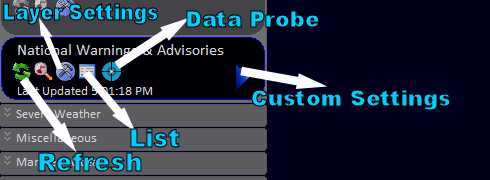
The Data Probe icon ( ) is available for some layers and allows the user to click on the map for layer-specific information at a certain geographical point.
The magnifying class icon ( ) toggles layer visibility, as does the layer button itself.
There is also a smoothing icon ( ) which toggles smoothing for raster layers.
Right-click the layer button to save its settings to a file.
Model Data

The model data selector allows you to select model, variable, domain, time, animated/static, and model run.
User changes to these settings are only applied when the pictured "Load" button is pressed. For the GFS model, the user can specify a custom domain by clicking the "Custom" button and checking the corresponding radio button.
For every model data variable, WeatherStudio automatically picks the best color palette to use with the layer. To customize the color palette and data scaling for the model data layer, you must uncheck "autoSettings" in the Layer Settings window for the target model data layer. (See "Layer Selector" above)
Automation Features
WeatherStudio has extensive automation features. The process of configuring automatic FTP uploading is described here (also see instructional video):
Create and save a .wsupload file by opening Automation->Web Uploading. Once you have entered a valid FTP configuration and have saved the .wsupload file, open the Command Line Graphics Builder at Automation->Command Line Graphics. Follow the onscreen prompts, except enter the location of the saved FTP settings (.wsupload) file where you would normally enter the output path of the created graphic.
Running WeatherStudio.exe with the generated parameter will execute the configured actions. Windows Task Scheduler can be used to automate this process.
High-Resolution Orthoimagery
View->Load Orthoimagery will load high quality satellite imagery as the map background. To improve rendering speeds, the now-invisible default background can be disabled from the same menu.
WeatherStudio incorporates NASA's Blue Marble Next Generation satellite imagery national and regional zoom levels. Tighter zooms will load LandSat imagery, and even tighter zoom levels will load the slow NAIP street imagery. (For locations where HRO is offered, this imagery can be used instead of the NAIP by clicking the corresponding settings in the View menu.)
For faster rendering and less burdened system resources, the High-Resolution Orthoimagery system can be configured to load only the BNMG imagery in the Options panel (Ctrl+O).